Basis Functions
Bezier
Bezier curves are the most simple type of NURBS, needing only the degree \(p\) to define the \((p+1)\) basis functions:
At the interval \(u \in \left[0, \ 1\right]\) and \(\forall i=0, \ \cdots, \ p\)
Bezier curves can be described also by Splines, which uses the knotvector \(\textbf{U}\)
Degree 1
Degree \(p\)
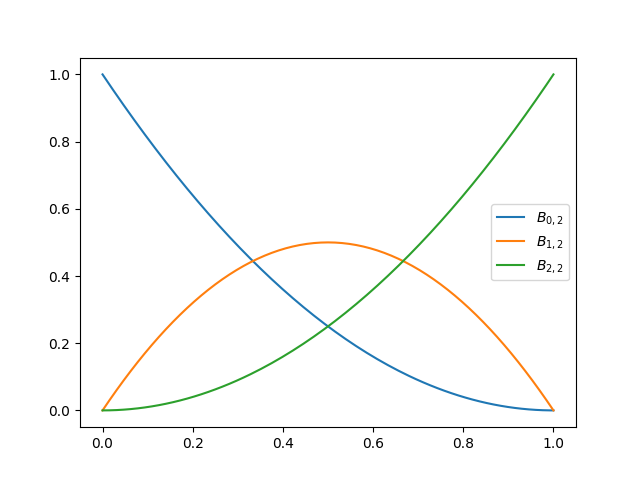
Use example
import numpy as np
from matplotlib import pyplot as plt
from pynurbs import GeneratorKnotVector, Function

degree = 2
knotvector = GeneratorKnotVector.bezier(degree)
bezier = Function(knotvector)

uplot = np.linspace(0, 1, 129)
for i in range(degree + 1):
    label = r"$B_{%d,%d}$" % (i, degree)
    plt.plot(uplot, bezier[i](uplot), label=label)
plt.legend()
plt.show()
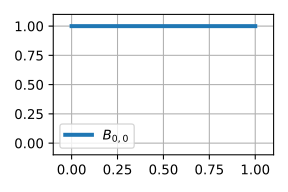
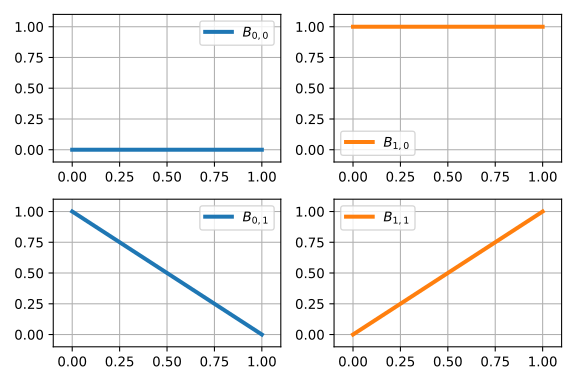
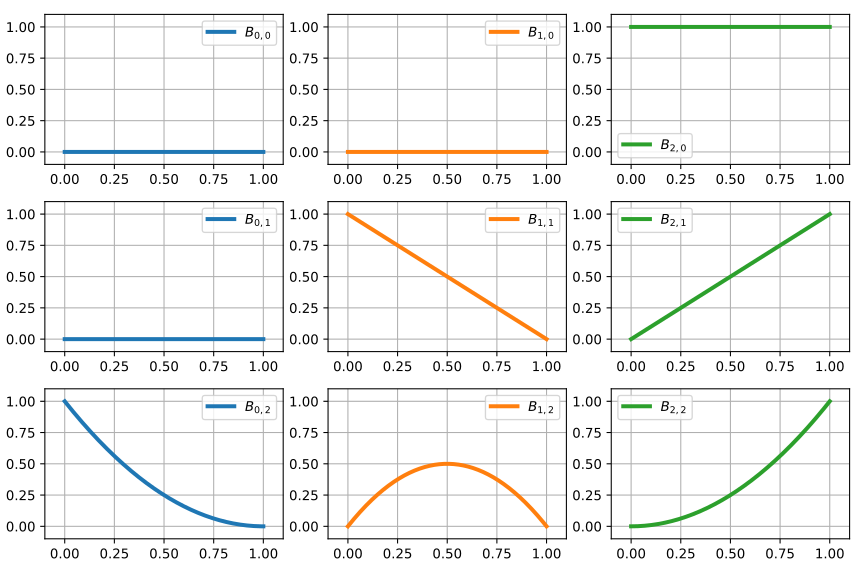
Although above the function \(B_{i,p}(u)\) is described only by \(p\), bellow we have the graphs of the basis functions by using the knotvector. They are in svg format and therefore you can open and expand to see better the image.
Basis functions for degree \(p=0\)
Basis functions for degree \(p=1\)
Basis functions for degree \(p=2\)
Basis functions for degree \(p=3\)
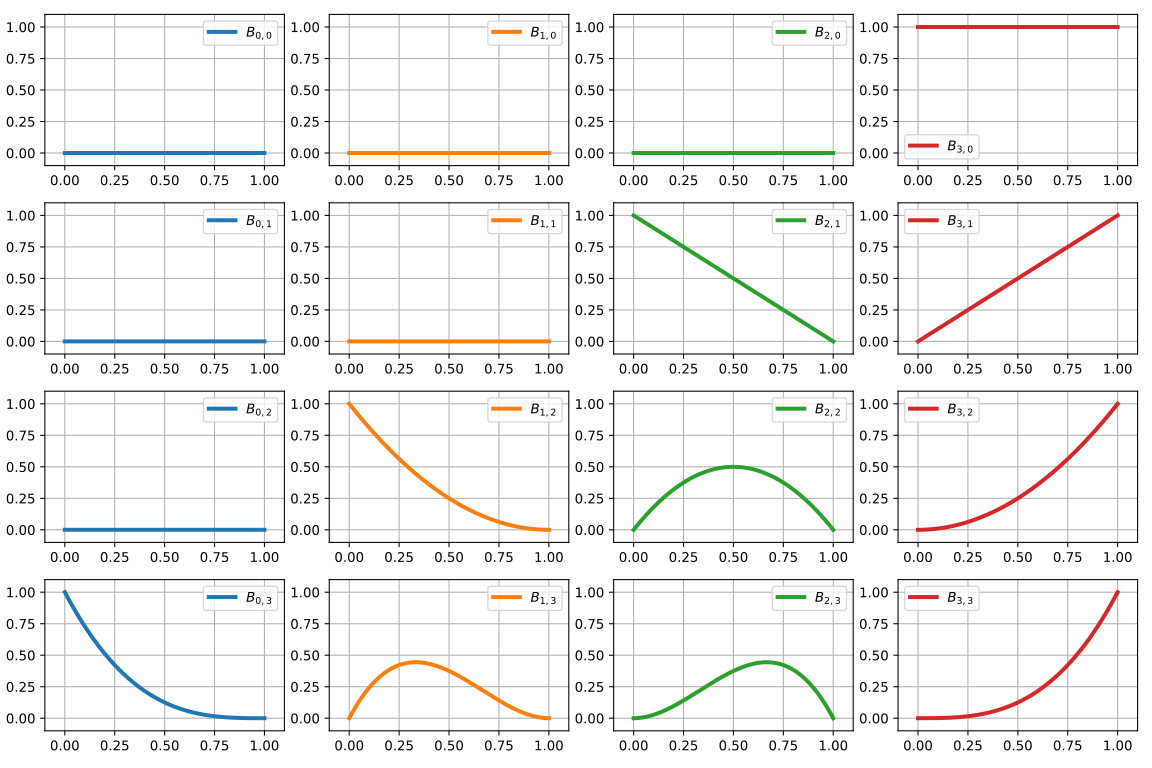
Basis functions for degree \(p=4\)
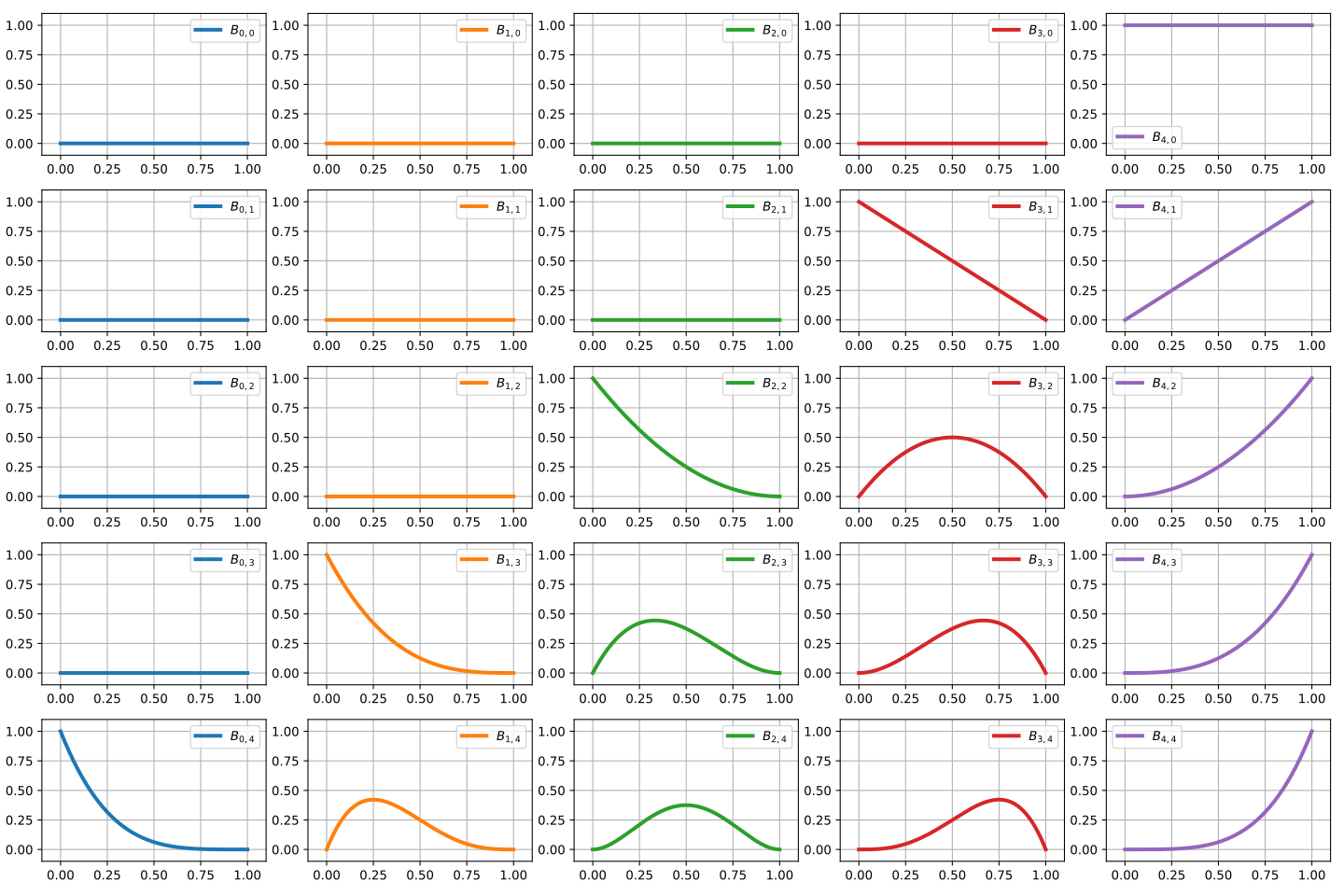
Basis functions for degree \(p=5\)
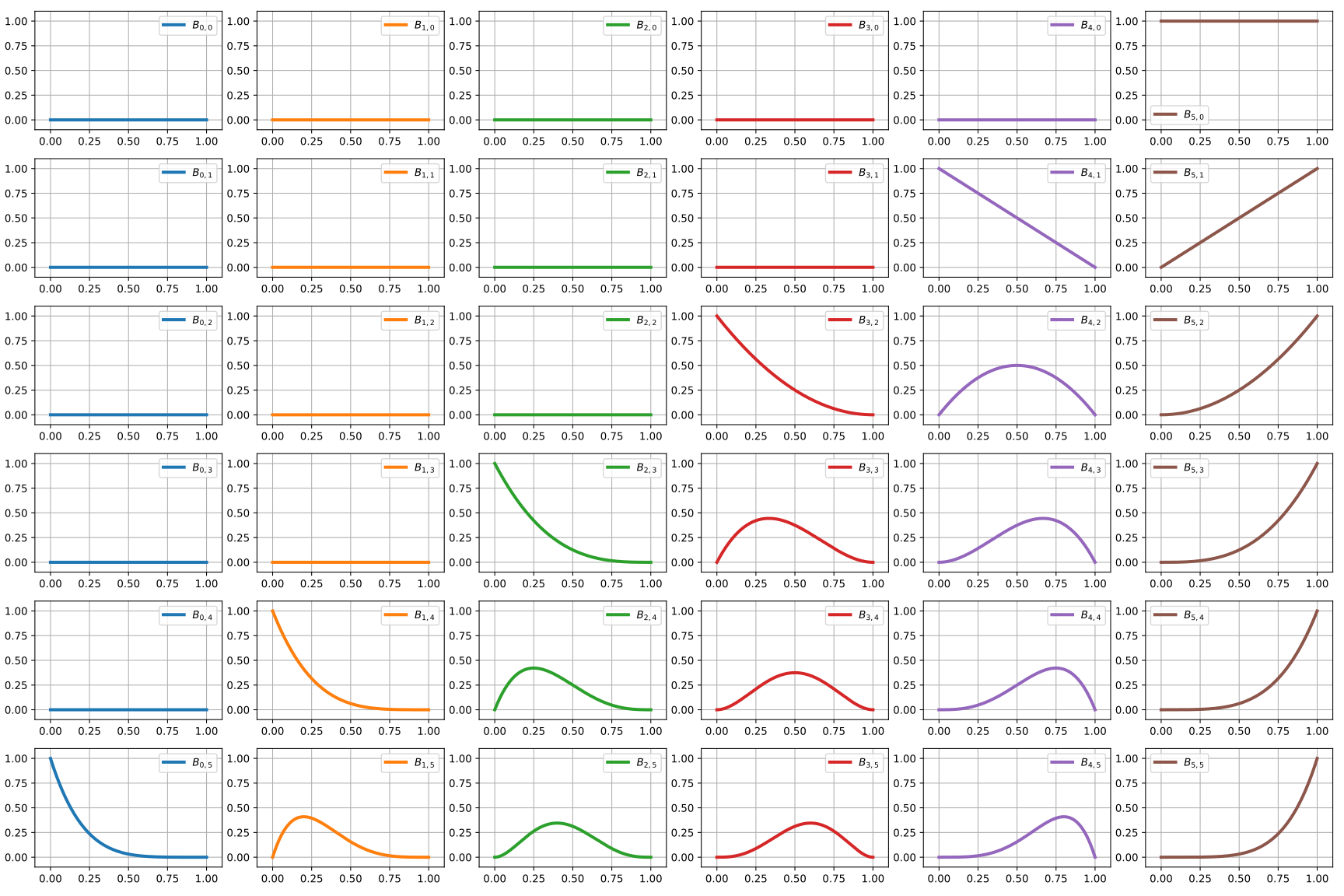
Code to generate all the bezier basis functions
import numpy as np
from matplotlib import pyplot as plt
from pynurbs import GeneratorKnotVector, Function

prop_cycle = plt.rcParams['axes.prop_cycle']
colors = prop_cycle.by_key()['color']
uplot = np.linspace(0, 1, 1029)
for degree in range(0, 6):
    knotvector = GeneratorKnotVector.bezier(degree)
    function = Function(knotvector)
    sizex = (degree+1)*3
    sizey = (degree+1)*2
    fig, axs = plt.subplots(degree+1, degree+1, figsize=(sizex,sizey))
    for j in range(0, degree+1):
        allvalues = function[:,j](uplot)
        for i, values in enumerate(allvalues):
            label = r"$B_{%d,%d}$"%(i,j)
            color = colors[i]
            ax = axs if degree == 0 else axs[j][i]
            ax.plot(uplot, values, label=label, linewidth=3,color=color)
            ax.set_xlim(-0.1, 1.1)
            ax.set_ylim(-0.1, 1.1)
            ax.legend()
            ax.grid()
    fig.tight_layout()
    plt.savefig("bezier-basisfunction-p%d.svg"%degree)
B-Spline
B-Splines uses the knotvector \(\mathbf{U}\) and is recursevelly defined by
Use example
import numpy as np
from matplotlib import pyplot as plt
from pynurbs import GeneratorKnotVector, Function

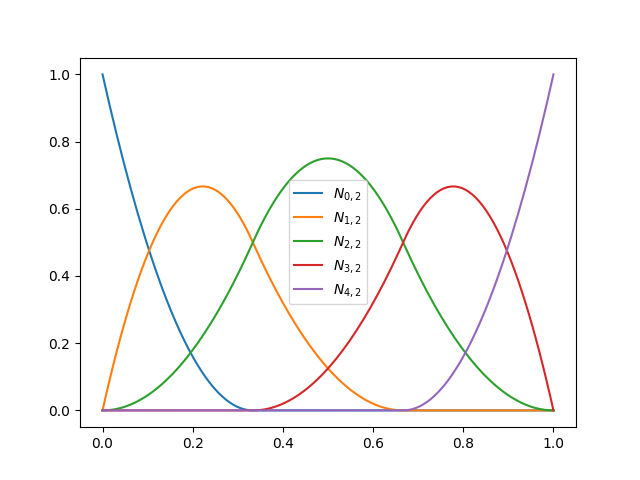
degree, npts = 2, 5
knotvector = GeneratorKnotVector.uniform(degree, npts)
spline = Function(knotvector)

uplot = np.linspace(0, 1, 129)
for i in range(npts):
    label = r"$N_{%d,%d}$" % (i, degree)
    plt.plot(uplot, spline[i](uplot), label=label)
plt.legend()
plt.show()
Uniform basis functions for degree \(p=0\) and \(\text{npts}=6\)

Uniform basis functions for degree \(p=1\) and \(\text{npts}=6\)
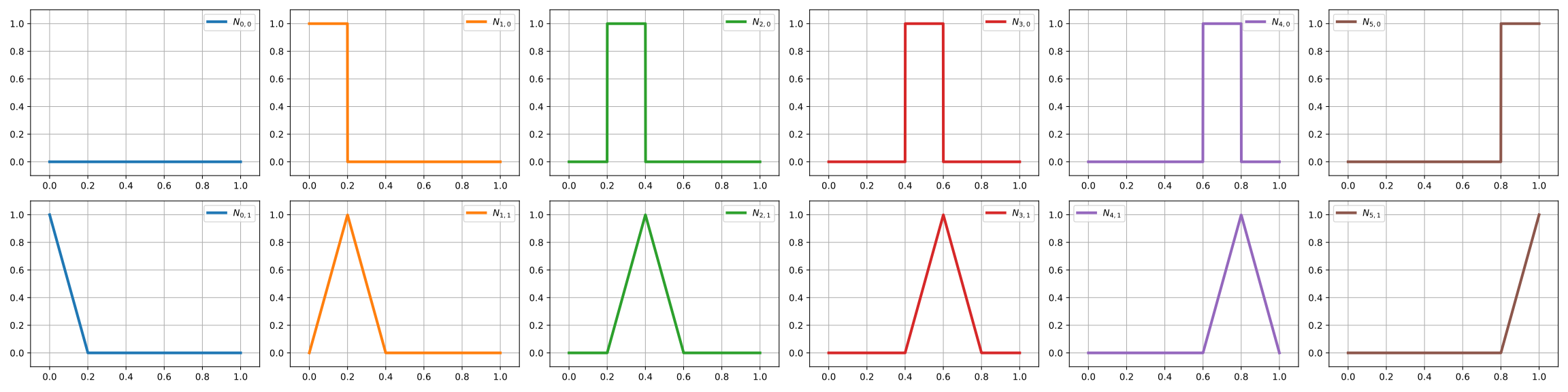
Uniform basis functions for degree \(p=2\) and \(\text{npts}=6\)
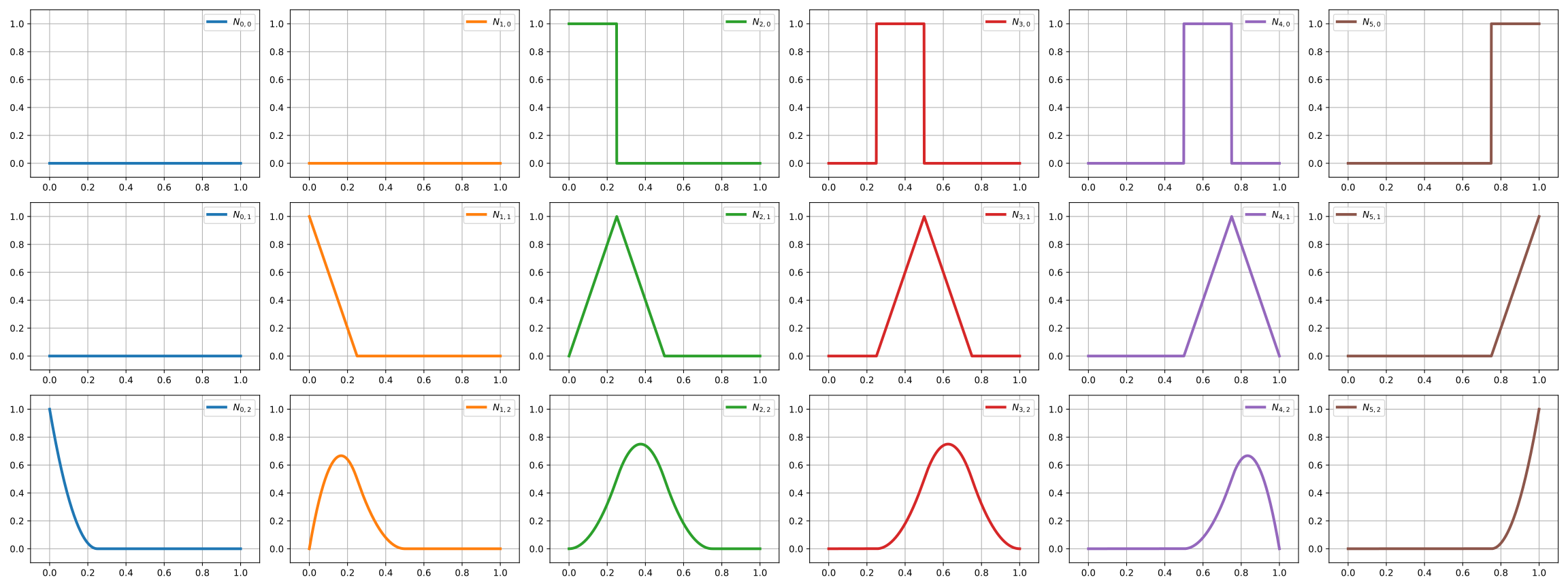
Uniform basis functions for degree \(p=3\) and \(\text{npts}=6\)
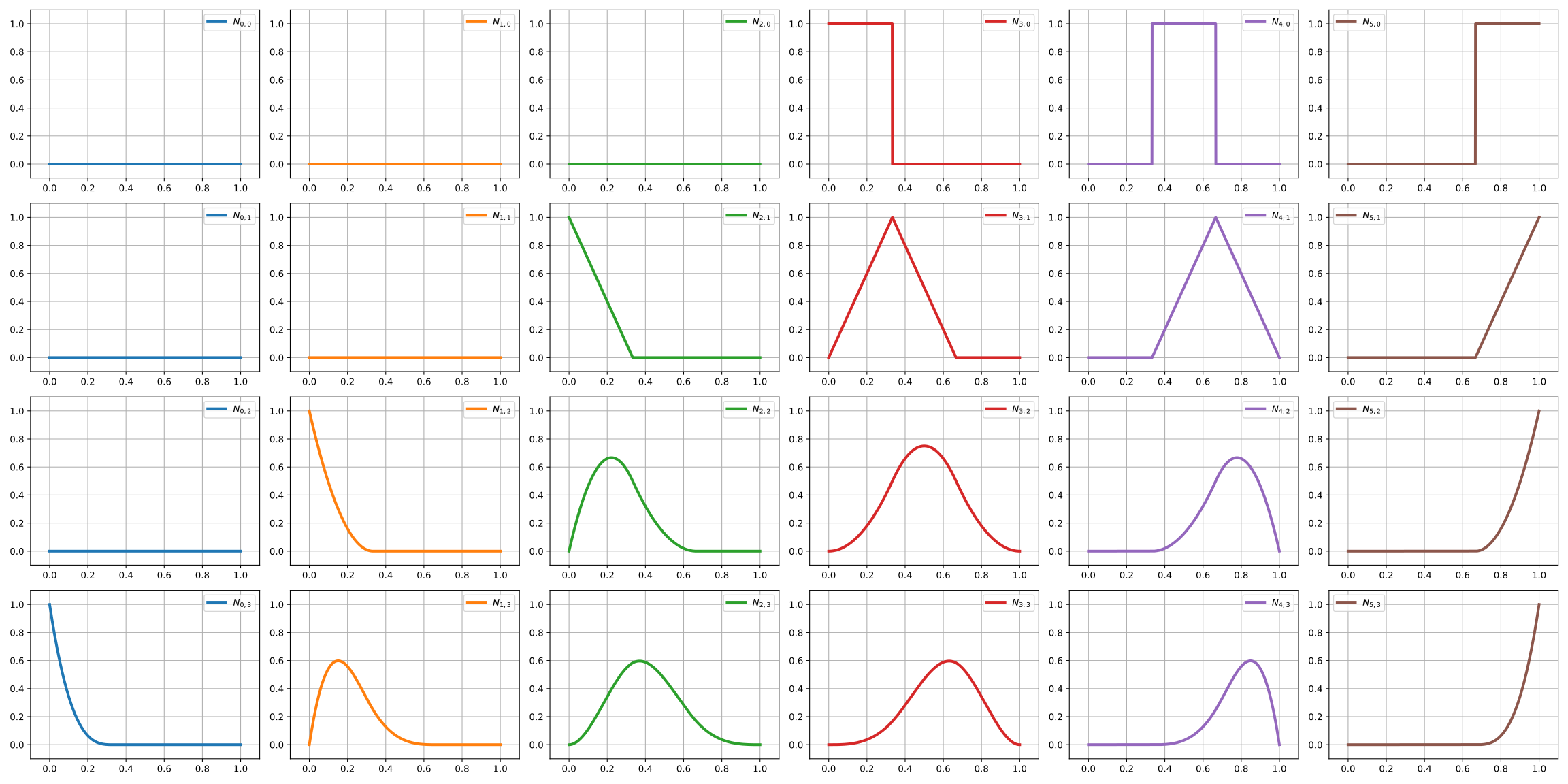
Uniform basis functions for degree \(p=4\) and \(\text{npts}=6\)
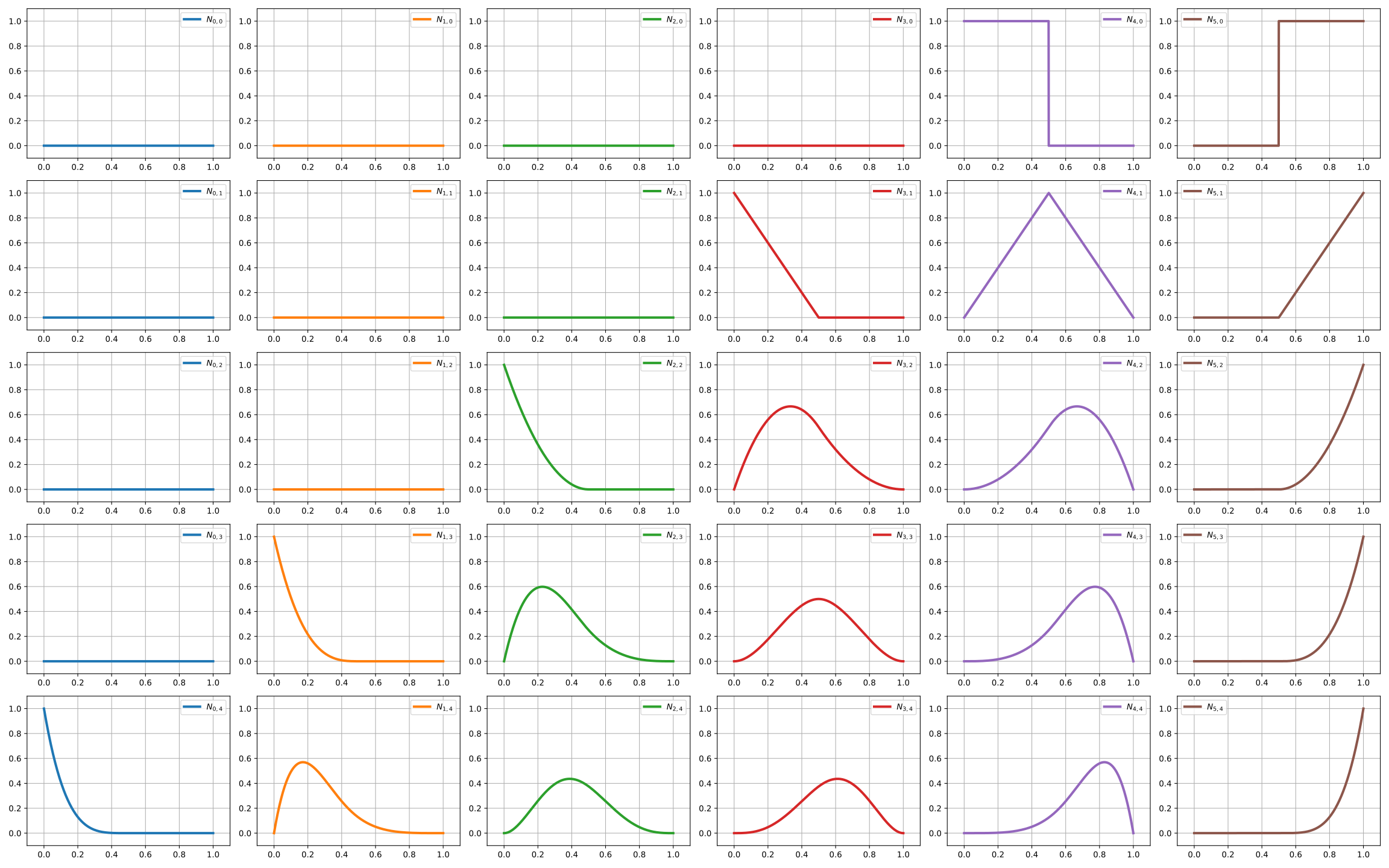
Code to generate all the spline basis functions
import numpy as np
from matplotlib import pyplot as plt
from pynurbs import GeneratorKnotVector, Function

prop_cycle = plt.rcParams['axes.prop_cycle']
colors = prop_cycle.by_key()['color']
uplot = np.linspace(0, 1, 1029)

nptsmax = 6
degmax = 4
for degree in range(0, degmax+1):
    nfigsy = degree+1
    sizex = nptsmax*4
    sizey = nfigsy*3
    fig, axs = plt.subplots(nfigsy, nptsmax, figsize=(sizex,sizey))
    knotvector = GeneratorKnotVector.uniform(degree, nptsmax)
    function = Function(knotvector)
    for j in range(0, degree+1):
        allvalues = function[:,j](uplot)
        for i, values in enumerate(allvalues):
            label = r"$N_{%d,%d}$"%(i,j)
            color = colors[i]
            ax = axs[i] if degree == 0 else axs[j, i]
            ax.plot(uplot, values, label=label, linewidth=3,color=color)
            ax.set_xlim(-0.1, 1.1)
            ax.set_ylim(-0.1, 1.1)
            ax.legend()
            ax.grid()
    fig.tight_layout()
    plt.savefig("splines-basisfunction-p%dn%d.svg"%(degree, nptsmax))
Rational B-Spline
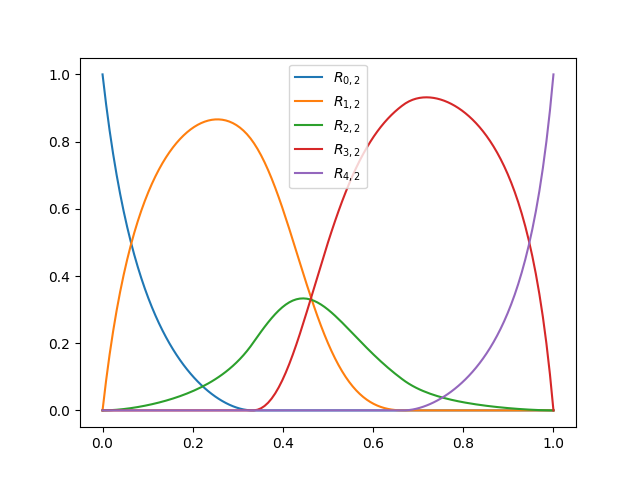
Like B-Splines, Rational B-Splines also uses the knotvector \(\mathbf{U}\), but along a weight vector \(\mathbf{w}\). It’s defined by
Use example
import numpy as np
from matplotlib import pyplot as plt
from pynurbs import GeneratorKnotVector, Function

degree, npts = 2, 5
knotvector = GeneratorKnotVector.uniform(degree, npts)
rational = Function(knotvector)
rational.weights = [1, 2, 0.5, 5, 2]

uplot = np.linspace(0, 1, 129)
for i in range(npts):
    label = r"$R_{%d,%d}$" % (i, degree)
    plt.plot(uplot, rational[i](uplot), label=label)
plt.legend()
plt.show()
Uniform basis functions for degree \(p=0\) and \(\text{npts}=6\)

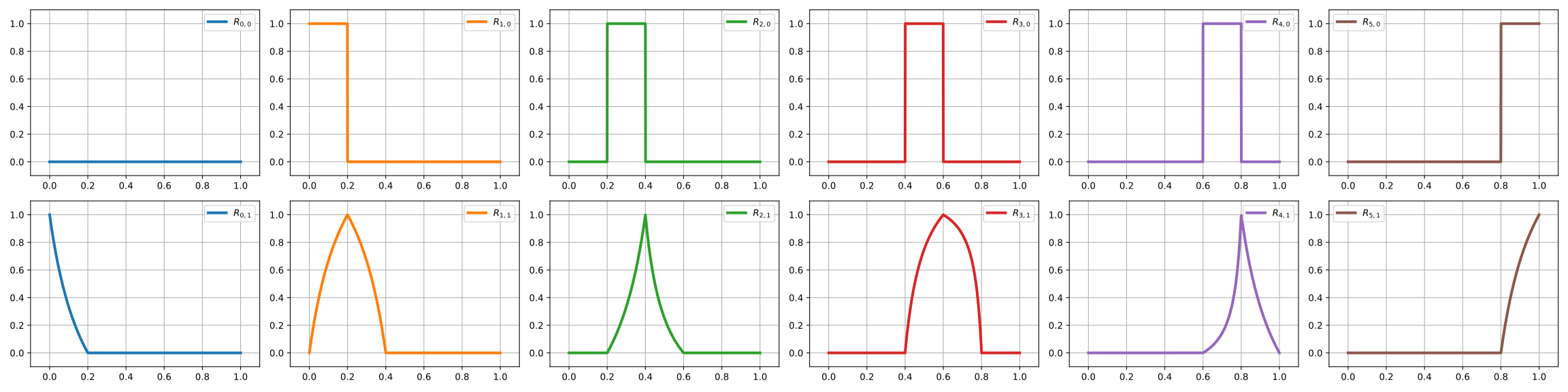
Uniform basis functions for degree \(p=1\) and \(\text{npts}=6\)
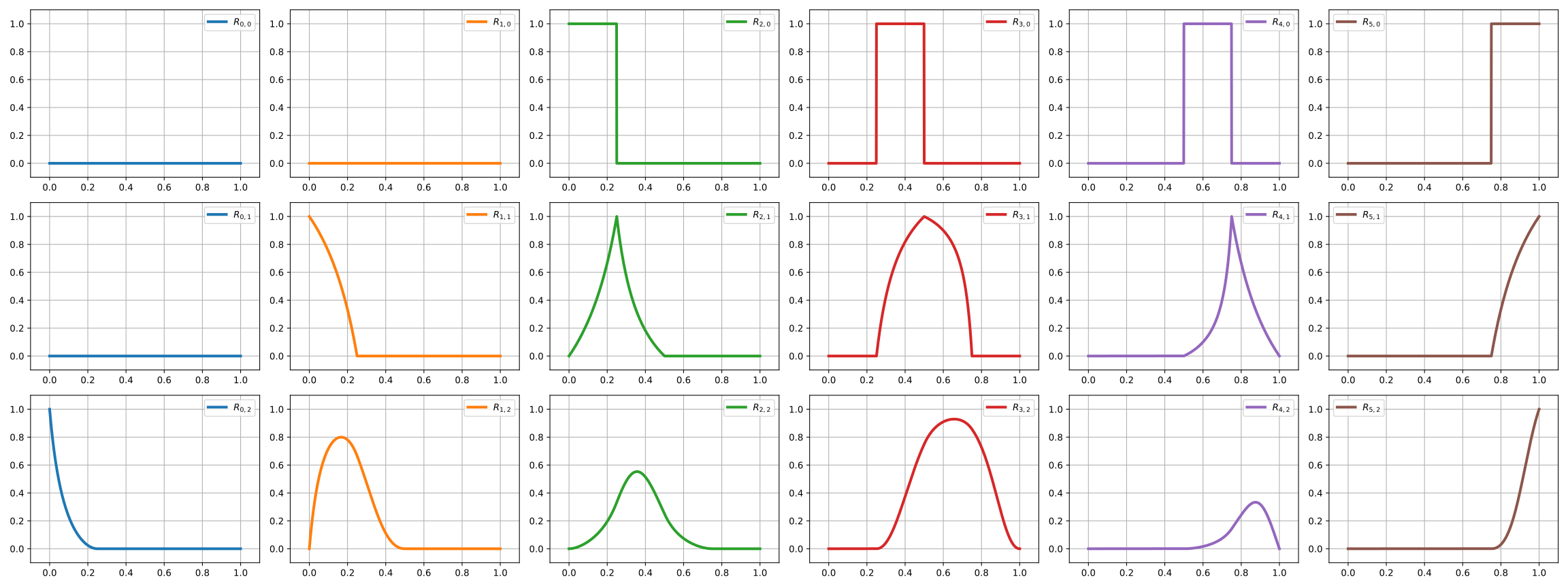
Uniform basis functions for degree \(p=2\) and \(\text{npts}=6\)
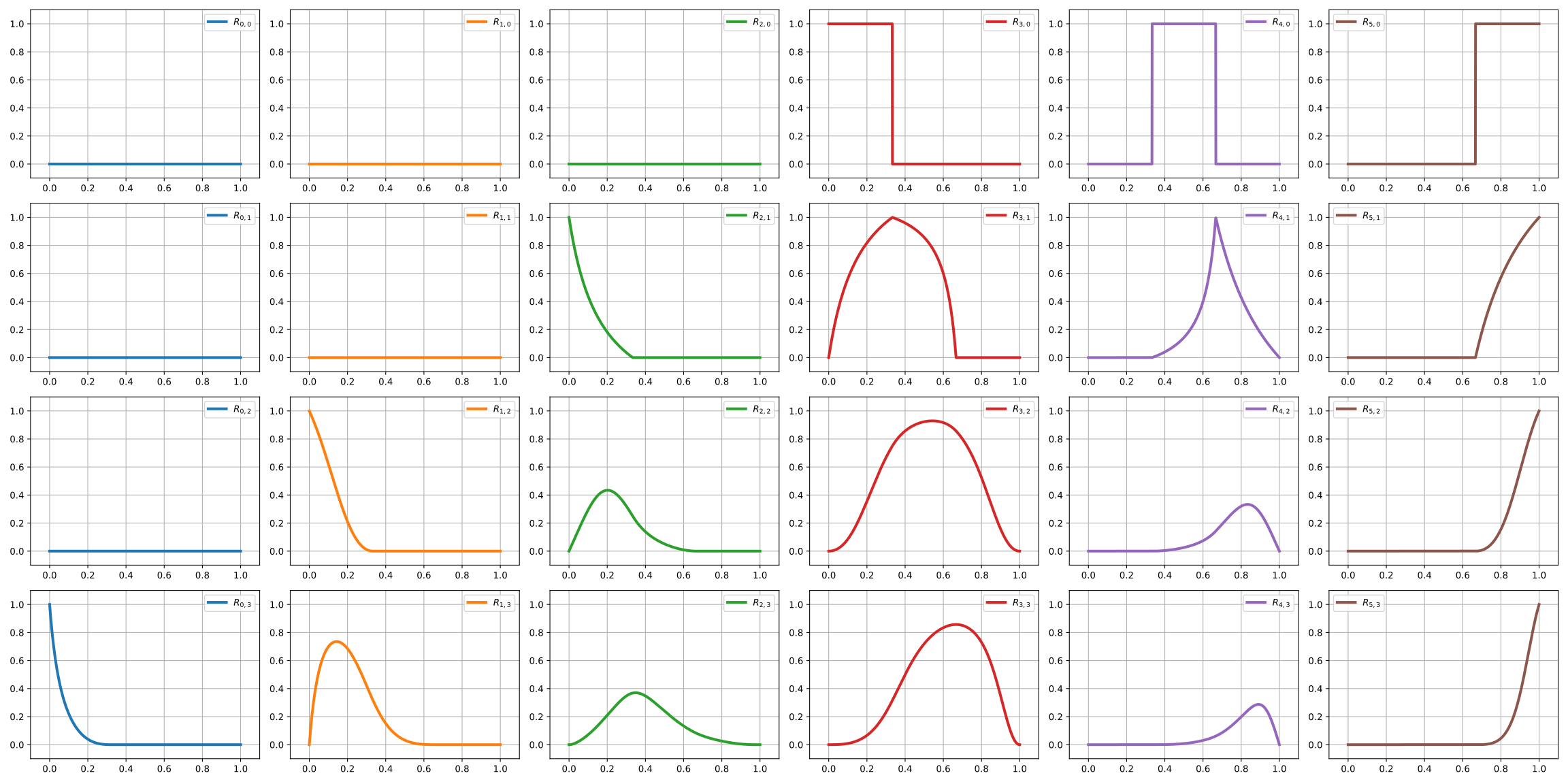
Uniform basis functions for degree \(p=3\) and \(\text{npts}=6\)
Uniform basis functions for degree \(p=4\) and \(\text{npts}=6\)
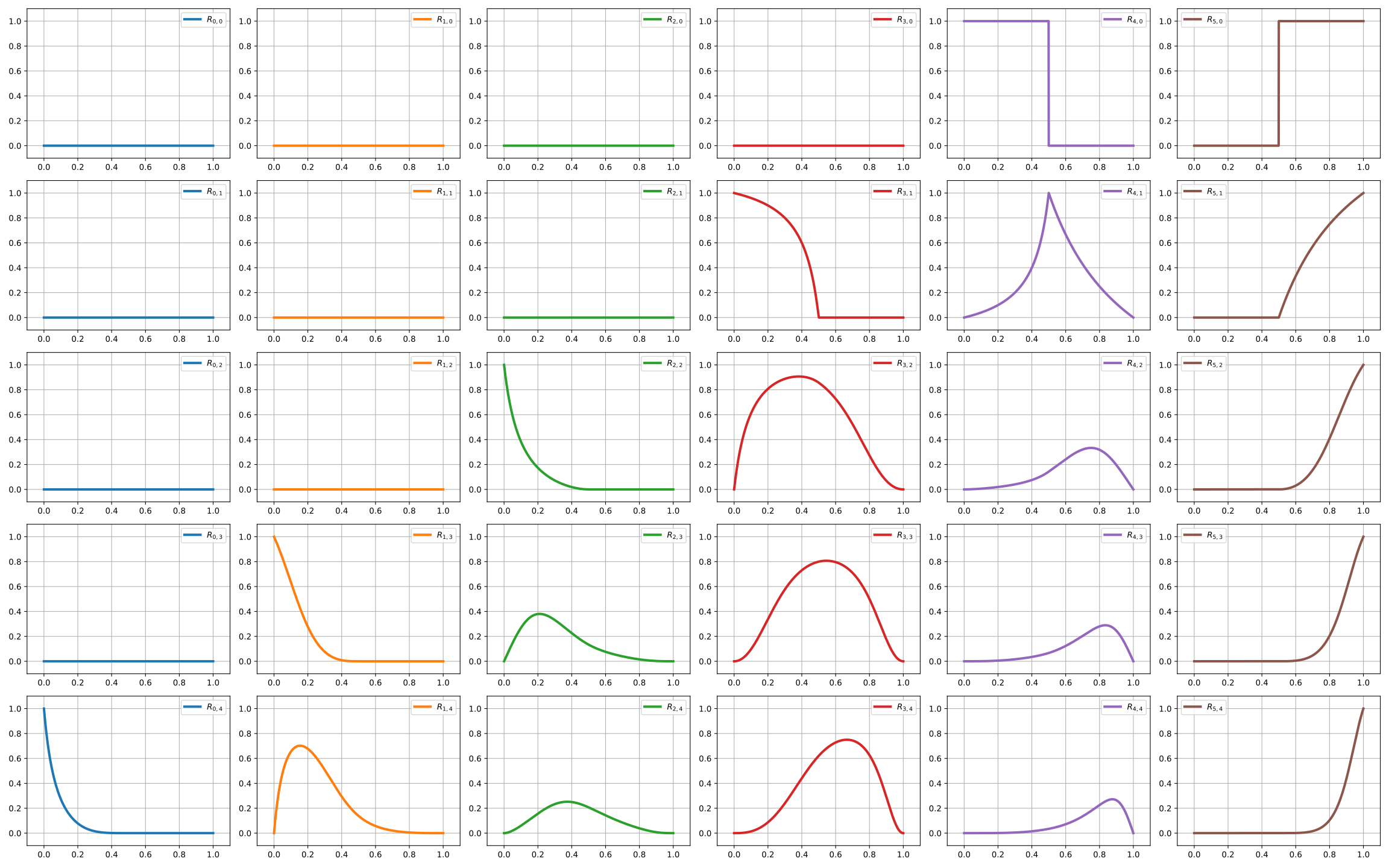
Code to generate all the rational spline basis functions
import numpy as np
from matplotlib import pyplot as plt
from pynurbs import GeneratorKnotVector, Function

prop_cycle = plt.rcParams['axes.prop_cycle']
colors = prop_cycle.by_key()['color']
uplot = np.linspace(0, 1, 1029)

nptsmax = 6
degmax = 4
for degree in range(0, degmax+1):
    nfigsy = degree+1
    sizex = nptsmax*4
    sizey = nfigsy*3
    fig, axs = plt.subplots(nfigsy, nptsmax, figsize=(sizex,sizey))
    knotvector = GeneratorKnotVector.uniform(degree, nptsmax)
    function = Function(knotvector)
    function.weights = [1, 2, 1, 3, 0.5, 1]
    for j in range(0, degree+1):
        allvalues = function[:,j](uplot)
        for i, values in enumerate(allvalues):
            label = r"$R_{%d,%d}$"%(i,j)
            color = colors[i]
            ax = axs[i] if degree == 0 else axs[j, i]
            ax.plot(uplot, values, label=label, linewidth=3,color=color)
            ax.set_xlim(-0.1, 1.1)
            ax.set_ylim(-0.1, 1.1)
            ax.legend()
            ax.grid()
    fig.tight_layout()
    plt.savefig("rational-basisfunction-p%dn%d.svg"%(degree, nptsmax))
Inserting knots in knotvector
We get an specific case and start inserting knots at center to see what happens with the basis functions
We start with the bezier of degree 3





Code to plot
import numpy as np
from matplotlib import pyplot as plt
from pynurbs import GeneratorKnotVector, Function

prop_cycle = plt.rcParams['axes.prop_cycle']
colors = prop_cycle.by_key()['color']
uplot = np.linspace(0, 1, 1029)

knotvector = GeneratorKnotVector.bezier(3)
knots_insert = [0.5, 0.5, 0.5, 0.5, 0.75]
for k, knot in enumerate(knots_insert):
    nfigsx = knotvector.npts
    sizex = nfigsx*4
    sizey = 3
    fig, axs = plt.subplots(1, nfigsx, figsize=(sizex,sizey))
    function = Function(knotvector)
    allvalues = function(uplot)
    for i, values in enumerate(allvalues):
        label = r"$N_{%d,%d}$"%(i,knotvector.degree)
        color = colors[i]
        ax = axs[i]
        ax.plot(uplot, values, label=label, linewidth=3,color=color)
        ax.set_xlim(-0.1, 1.1)
        ax.set_ylim(-0.1, 1.1)
        ax.legend()
        ax.grid()
    fig.tight_layout()
    plt.savefig("insertion_p%dstep%d.svg"%(knotvector.degree, k))
    knotvector.insert([knot])
Non uniform splines
This section shows the basis function when the knotvector is not uniform.
We do it by inserting the knot \(0.25\) many times by starting with a bezier curve of degree 3





Code to plot
import numpy as np
from matplotlib import pyplot as plt
from pynurbs import GeneratorKnotVector, Function

prop_cycle = plt.rcParams['axes.prop_cycle']
colors = prop_cycle.by_key()['color']
uplot = np.linspace(0, 1, 1029)

knotvector = GeneratorKnotVector.bezier(3)
knots_insert = [0.25, 0.25, 0.25, 0.25, 0.75]
for k, knot in enumerate(knots_insert):
    nfigsx = knotvector.npts
    sizex = nfigsx*4
    sizey = 3
    fig, axs = plt.subplots(1, nfigsx, figsize=(sizex,sizey))
    function = Function(knotvector)
    allvalues = function(uplot)
    for i, values in enumerate(allvalues):
        label = r"$N_{%d,%d}$"%(i,knotvector.degree)
        color = colors[i]
        ax = axs[i]
        ax.plot(uplot, values, label=label, linewidth=3,color=color)
        ax.set_xlim(-0.1, 1.1)
        ax.set_ylim(-0.1, 1.1)
        ax.legend()
        ax.grid()
    fig.tight_layout()
    plt.savefig("insertion025_p%dstep%d.svg"%(knotvector.degree, k))
    knotvector.insert([knot])